For most marketing teams, data is usually the biggest opportunity but also one of the biggest obstacles. We felt this same struggle and with campaigns running across multiple platforms, KPIs scattered across disconnected tools, and reporting cycles growing more demanding every quarter, our marketing team often found we were spending more time collecting data rather than actually acting on it.
Hurree was built to solve this problem, and as a marketer here, I rely on it every day. Hurree has been designed for centralizing data, simplifying processes, and transforming complex metrics into clear, actionable insights. One of the most powerful ways we ensure Hurree continues to deliver on that promise is by using it ourselves. Our marketing team relies on Hurree daily to track campaigns, analyze performance, and make confident, data-driven decisions.
How our marketing team uses Hurree
The challenge: Fragmented data and time-consuming reporting
Before using Hurree, we faced a few challenges that will probably sound familiar to most marketers:
- Numerous ad campaigns running across a variety of platforms
- Social media KPIs tracked separately in Meta Business Suite, LinkedIn, TikTok, etc.
- Email marketing metrics siloed inside an internal email service provider like HubSpot or Klaviyo
- Weekly and monthly reporting cycles slowed down by manual spreadsheet work and constant cross-checking
- Difficulty understanding which campaigns were driving value versus those that were draining budget
As the business grew, so did the need for a single source of truth. We needed one place where every metric, campaign and performance trend could be understood at a glance, without slogging through rows and rows in a spreadsheet or jumping from tab to tab to track data in different places.
The solution: Centralized dashboards, automation & collaboration through Hurree
By using Hurree internally, we created a unified data environment that supports daily decisions as well as long-term strategy. Hurree allows us to:
- Connect key platforms such as HubSpot, Meta, TikTok, LinkedIn and Google Sheets
- Build custom dashboards for every marketing function, either at an overview level or a granular level for in-depth performance deep dives
- Receive automated reports straight to our inboxes
- Use Riva to translate complex data into clear summaries with recommendations
- Tag team members directly when something needs immediate attention
- Automate repetitive reporting tasks that previously took hours
The impact: Real results across email, paid ads and social
Since adopting Hurree for our own internal reporting, the marketing team has seen measurable improvements:
- LinkedIn Ads
+ 25% impressions
+ 36.5% CTR
– 68% CPC - LinkedIn growth
+ 2.72% follower growth rate - Email marketing
+ 37.3% open rate
+ 36% click-through rate
These improvements didn’t happen by chance. They came from the way we now work, reviewing performance daily, spotting issues earlier, and making faster decisions because all our data lives in one place. Here are some of the specific examples where Hurree has helped us excel in a range of marketing functions:
1. Paid ads: A single view of every campaign
Paid ads are one of the most complex areas for us to monitor and one of the biggest tactics we use to acquire new leads and customers. With campaigns running across multiple platforms, we needed a way to see performance clearly without jumping between tools or rebuilding reports.
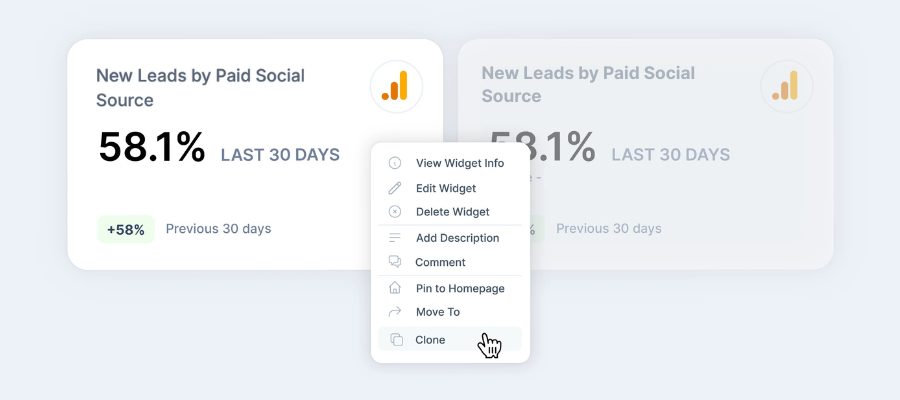
Hurree simplifies this by bringing everything together into one place. We chose to create separate dashboards for each ad campaign, allowing us to quickly compare performance without having to build new reports every month. Once a dashboard is created, we simply clone it and update the date ranges, saving hours of manual work.
.png?width=618&height=275&name=New%20Leads%20By%20Paid%20Traffic%20Source%20(3).png)
How our marketing team uses Hurree for paid ads
1. Cross-platform KPIs are pulled into one dashboard
Campaigns from LinkedIn Ads, Meta Ads and Google Ads are each displayed as a number, chart, graph or list widget, giving us a full overview of all campaigns in the most visually appropriate way.
2. Widgets are cloned and customized for each active campaign
This makes setup fast, even when working with multiple variations or A/B tests.
3. Benchmarks, summaries and predictions are layered in
We can instantly see whether campaign performance is trending positively or falling below expected levels.
4. Centralized data reveals insights that would otherwise be missed
As an example, we identified that although conversion rates looked strong on paper, the quality of those conversions was low. By having all KPIs side by side, we realised our ICP wasn’t being targeted effectively, leading to a refined strategy.
The outcome:
Within one month, we improved impressions, CTR, and CPC dramatically on LinkedIn Ads simply through better visibility and data-driven decision-making.
Want to save this guide for later?
Complete the form below and get an ebook version sent straight to your inbox.
2. Email marketing: Clearer performance & stronger segmentation
Within Hurree, our product marketing team manages customer-focused email campaigns, such as onboarding flows, feature announcements, and product education, while the Growth Marketing team manages lead-generation email campaigns, including re-engagement sequences, nurture workflows, and monthly content newsletters.
Both teams use Hurree in slightly different ways because their objectives differ.
- Product marketing aims to increase user engagement and drive deeper adoption of the Hurree platform.
- Growth marketing focuses on attracting and nurturing potential customers with value-driven content.
Hurree brings both teams together under one reporting system, giving each department the ability to track performance, analyze audience behaviour, and make data-driven decisions that directly support their goals.
How our product marketing team uses Hurree for email marketing
The product marketing team needs to understand how users interact with the Hurree platform and which communications drive the strongest engagement. Hurree helps them track the metrics that matter most:
KPIs they track inside Hurree include:
- Open rate: To understand which feature releases or onboarding steps users are most interested in.
- Click-through rate (CTR): To identify which calls-to-action or product updates encourage users to explore the platform further.
- Unsubscribe rate: To monitor content fatigue and ensure communications remain relevant and helpful.
- Top emails by CTR: To spot which feature announcements’ subject lines resonate best with users.
How Hurree supports our product marketing team:
- The team connects their email tool (HubSpot) directly into Hurree, allowing them to visualize KPIs side-by-side.
- Benchmarks help determine whether a campaign performed above or below expectations.
- Predictions and AI summaries (Riva) surface optimization opportunities, e.g., best send times, impactful subject lines, or high-performing feature topics.
- Seeing trends over time help us refine onboarding journeys and understand which product messages drive platform usage.
Example:
When we launched our AI dashboard summaries feature, we saw a clear spike in open rates compared to previous product update emails. By spotting this quickly in Hurree, we knew the message resonated with our customers, so we amplified it through in-app notifications and follow-up walkthrough content.
In contrast, when we released our dashboard branding customisation feature, CTR was lower. Hurree made this visible immediately, allowing us to adjust the email messaging to better communicate the value of the feature and prompting us to create additional help centre articles and walkthrough content. This led to improved engagement in subsequent sends and increased feature usage within the Hurree platform.
.png?width=900&height=400&name=New%20Leads%20By%20Paid%20Traffic%20Source%20(1).png)
How our growth marketing team uses Hurree for email marketing
Our growth marketing team uses email to educate, nurture and convert potential customers. Their focus is on understanding what content drives the highest engagement and how audiences move through the funnel.
KPIs we track inside Hurree include:
- CTR on monthly content newsletters: To see which blogs, templates, or resources readers engage with the most.
- Open rate on nurture workflows: To test which subject lines or topics resonate best with top-of-funnel audiences.
- Conversion-based metrics: Such as form submissions or ebook downloads linked back to email performance.
- Unsubscribe rate: To gauge list health and relevance of content.
How Hurree supports our growth marketing team:
- Multi-datapoint graphs allow us to compare newsletter performance month over month.
- Creating list widgets such as “Top emails by CTR” helps them understand which content themes (e.g., KPI reporting tips, AI in analytics, dashboard templates) perform best.
- Benchmarks help the team set measurable goals for each campaign, e.g., target CTR for newsletters or acceptable unsubscribe thresholds.
- Predictions help them forecast engagement and adjust content strategy before launching campaigns.
Example:
In our monthly content newsletter, we noticed that links to blogs focused on KPI templates and 40 most important KPI for marketers ebook consistently generated higher click-through rates than other topics. Hurree made this trend immediately visible, allowing us to spot which content themes were resonating most with our audience.
Off the back of this insight, we prioritised KPI and reporting-focused topics into our blog content calendars, social media posts, as well as creating more downloadable resources around KPI measurement and reporting best practices.
The outcome:
This more targeted, data-led approach contributed to a 37.3% increase in email open rates and a 36% increase in CTR.
3. Social media: one source of truth for multi-channel reporting
Social teams often struggle with scattered data, and our team are no different. LinkedIn reports in one place, Instagram and Facebook in another, and TikTok somewhere else. Tracking growth, engagement and reach across all social channels becomes an exhausting monthly task.
Hurree centralizes everything for us. Here’s how our social marketing team uses Hurree for social media reporting:
- All social KPIs are added to one dashboard, with specific sections per channel
- “This month vs previous month” date ranges and comparisons are added, which allow for instant insights into overall monthly performance
- Setting customizable benchmarks for the data highlights whether engagement is good, average or low
- Widget history reveals long-term trends which are difficult to access in many native tools
- Multi-datapoint graphs allow critical comparisons between different platforms’ performance based on the outcome and goals set for each channel in any particular month
- List widgets show top-performing posts each month for each social channel
- Riva Summaries give plain, easy-to-read text summaries of performance, and Riva Suggests provides actionable recommendations for how to improve performance going forward
- Monthly snapshots are set up to be sent directly to our marketing manager to report performance for the month
The outcome:
Using Hurree-powered insights, we achieved a + 2.72% follower growth rate on LinkedIn.
4. Manual inputs: When custom data still needs a place
Even with Hurree’s strong integrations, most marketing teams still have niche or internal data that lives outside their standard tools, and our team were no different. We use Hurree to solve this through:
- Google Sheets connector: This automatically pulls data from an external Google Sheets spreadsheet directly into Hurree. Once it’s connected to our dashboard, it is simple and easy to update when needed. We use the Google Sheets connector to monitor data from our internal analytics app that tracks usage of the Hurree platform itself. This allows us to track bespoke trial and customer metrics from our internal analytics app, alongside native Hurree platform data. Hurree automatically compares each new manual entry to the previous period, helping us track trends without additional spreadsheets.
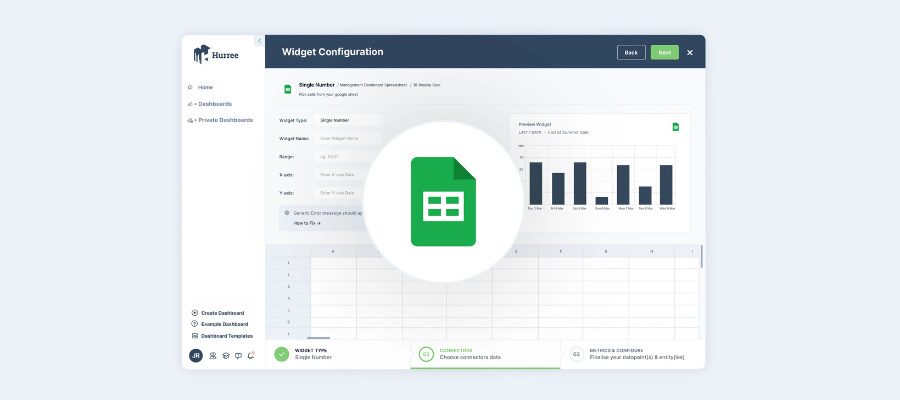
- Manual widgets: These are simple input fields that are used for some of the data from third party tools that Hurree doesn’t currently integrate with, like bespoke payment systems. These are quick and easy to set up and can easily be updated when required.
Using Hurree internally has completely changed how we work as a marketing team. We spend less time pulling reports, fewer hours in spreadsheets, and more time acting on insights that actually improve performance.
Whether we’re scaling paid campaigns, refining our email strategy, or reporting on social performance, Hurree gives us a single source of truth and the confidence to make faster, better decisions every day to drive growth. If you’re ready to spend less time reporting and more time driving real marketing performance, see what Hurree can do for your team.
Want a downloadable version of this blog? Complete the form below and get your ebook copy sent directly to your inbox.


Share this

[Infographic] 6 KPIs That Marketers Should Be Tracking

6 Alternatives to Excel for Marketers