Every agency reaches the same breaking point. Clients multiply. Platforms stack up. And every Friday, someone is still copying numbers out of Meta Ads, pasting screenshots into slides, and hoping the figures match what Google Analytics is showing.
It is not a talent problem. It is a systems problem. And it compounds fast.
When reporting is manual, small agencies waste hours every week on work that does not move performance. Analysts reconcile instead of optimise. Account managers present instead of strategize. And errors creep in exactly when client trust matters most.
Automating marketing reports fixes this at the root. It replaces the weekly scramble with a system that pulls data, normalises it, and delivers accurate dashboards without anyone having to touch a spreadsheet. The result is faster decisions, fewer errors, and reporting that scales with your client base instead of straining it.
This guide explains how to build that system from the ground up.
This guide covers:
- Key components of automated marketing reports for agencies
- Common failures in agency reporting workflows
- Steps to automate marketing reports end-to-end
- Tools and integrations needed for reporting automation
- How to structure client dashboards for decision making
- Metrics that belong in automated marketing reports
- How to maintain data quality in automated reporting systems
- How Hurree can help
Key components of automated marketing reports for agencies
Automated marketing reports for agencies depend on consistent inputs, standardized metrics, and reliable refresh schedules that eliminate manual data work. Each component supports scale by removing tasks that do not contribute to performance strategy.
The operational problem appears when agencies rebuild reporting from scratch for every client, rely on screenshots, and spend hours reconciling data between ad platforms and analytics tools. The strategic consequence is shrinking margins and weakened client confidence due to inconsistent results. The fix is to define the core components that drive automated reporting and apply them to every client relationship.

Key components include:
- Data source integrations: direct connections to GA4, Meta Ads, Google Ads, HubSpot, and CRM or email tools that refresh daily.
- Metric normalization: shared definitions for conversions, revenue, attribution windows, and naming conventions used across platforms.
- Dashboard framework: a repeatable layout used for all clients to streamline onboarding and minimise custom builds.
- Automated refresh logic: scheduled syncs that update reports without analyst intervention.
- Insight layer: automated KPI summaries and deviation alerts surfacing key shifts without manual analysis.
|
Component |
Function |
Operational risk |
Impact on reporting |
|
Data sources |
Connect and unify platform data |
Manual pulls and errors |
Delays and inconsistent numbers |
|
Normalization rules |
Align definitions across channels |
Conflicting metrics |
Misleading ROI conclusions |
|
Dashboard structure |
Standard client view |
One-off builds |
High maintenance workload |
|
Refresh schedules |
Automatic data updates |
Stale or missing data |
Loss of client trust |
|
Insight layer |
Highlight key performance changes |
Analyst-only interpretation |
Missed trends and slow decisions |
The key takeaway is that automation succeeds only when inputs, structures, and refresh cycles are standardised across every client.

Common failures in agency reporting workflows
Common failures in automated marketing reports for agencies stem from unstable data sources, inconsistent metric definitions, and manual steps hidden inside reporting processes. Each failure introduces friction and increases labour costs.
The operational problem appears when agencies scramble every week to assemble client reports, hunting through multiple tools and pasting screenshots into decks. The strategic consequence is staff burnout, client dissatisfaction, and lower retention due to unclear ROI narratives. The fix is to identify the most common failure points and remove manual steps through structured automation.

Typical failures include:
- Inconsistent conversion definitions: unclear differences between form submits, booked calls, MQLs, and purchases across channels create misaligned reporting.
- Manual screenshot workflows: capturing platform screenshots instead of connecting integrations creates version control issues and errors.
- Platform data discrepancies: agencies struggle when Meta Ads, Google Ads, and GA4 do not align, causing confusion during client reviews.
- Unstructured spreadsheet reporting: custom spreadsheets managed by different team members lead to mismatched formulas and fragile reporting.
- No automated KPI tracking: analysts notice performance drops only after clients ask about results.
|
Failure type |
Operational impact |
Strategic consequence |
|
Inconsistent conversions |
Analysts debate definitions |
Weak ROI narrative |
|
Manual screenshots |
Slow report creation |
Lower margins |
|
Data discrepancies |
Long client calls |
Reduced confidence |
|
Unstructured sheets |
Fragile reporting |
High training costs |
|
No KPI alerts |
Slow reactions |
Missed revenue opportunities |
The key takeaway is that automation solves these failures by enforcing consistency and removing manual effort from reporting.
Steps to automate marketing reports end-to-end
Automated marketing reports for agencies follow a repeatable sequence that connects data, structures it, and delivers insight without manual work. The steps build on each other to create a stable reporting workflow.
The operational problem appears when agencies try to automate without first defining their reporting logic, leading to messy dashboards and unclear metrics. The fix is to follow a structured automation process from the outset.

Steps to automate marketing reports:
- Define your reporting framework: identify the metrics, dashboards, and weekly cadence applied across all clients.
- Map data sources: connect GA4, Meta Ads, Google Ads, and CRM tools to a centralised platform or warehouse.
- Normalise all metrics: create a shared dictionary for conversions, spend, revenue, and attribution windows.
- Build reusable dashboard templates: develop a standard interface that can be applied to all clients.
- Set automated refresh schedules: ensure data updates daily or weekly depending on client expectations.
- Enable KPI deviation alerts: configure automatic notifications for spend spikes, CPA increases, or decline in conversions.
- Add insight automation: use AI tools to summarise performance and highlight key changes.
This consistent sequence reduces operational chaos and ensures every client benefits from the same reporting maturity.
Tools and integrations needed for reporting automation
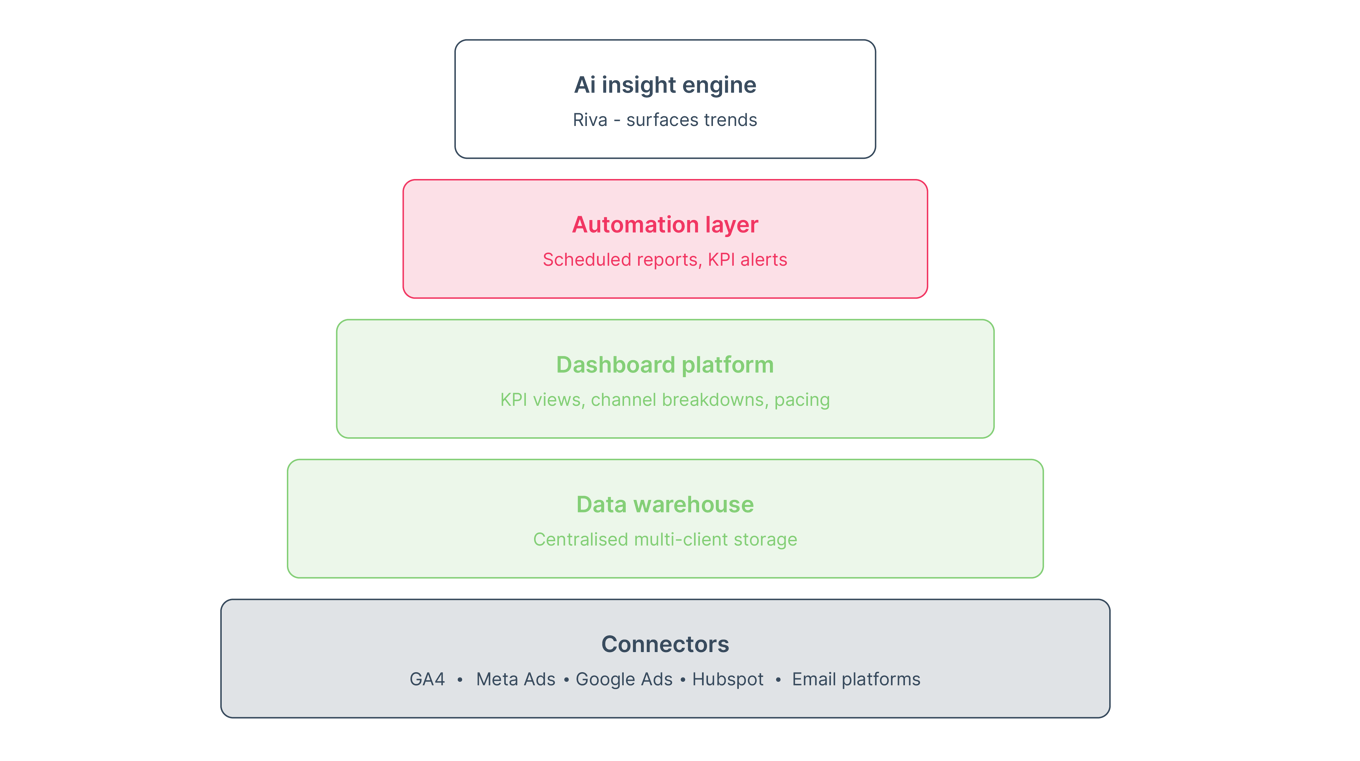
Automated marketing reports for agencies rely on a combination of integrations, connectors, and analysis tools that ensure data flows smoothly. Each tool supports a different layer of the reporting stack.
The operational problem appears when agencies rely on disconnected platforms or make analysts manually migrate data between tools. The fix is to design a deliberate tool stack that supports long-term automation.
Common tool categories include:
- Data connectors: direct integrations to GA4, Meta Ads, Google Ads, HubSpot, and email platforms that sync data automatically.
- Data warehouses: centralised storage for large or multi-client datasets used by growing agencies.
- Dashboarding platforms: tools that display KPIs and performance trends in structured views.
- Automation platforms: systems that generate weekly summaries, client-ready reports, and KPI alerts.
- AI insight engines: tools that explain performance drivers, highlight trends, and suggest next steps.
|
Tool category |
Function |
Agency benefit |
|
Connectors |
Pull platform data |
Less manual work |
|
Warehouses |
Store unified data |
Scales with client count |
|
Dashboards |
Visualise metrics |
Faster client reviews |
|
Automation |
Package updates |
Weekly reporting without effort |
|
AI insights |
Interpret data |
Clearer ROI narratives |
The key takeaway is that agencies should choose tools based on integration stability, not novelty.
How to structure client dashboards for decision-making
Client dashboards in automated marketing reports for agencies must follow a predictable hierarchy that guides clients toward insight. Each dashboard should create clarity and reduce interpretation time.
The operational problem appears when dashboards contain too many widgets, inconsistent layouts, or confusing navigation. The strategic consequence is long client calls spent explaining basic performance instead of discussing strategy. The fix is to use a defined dashboard structure purpose-built for weekly reviews.
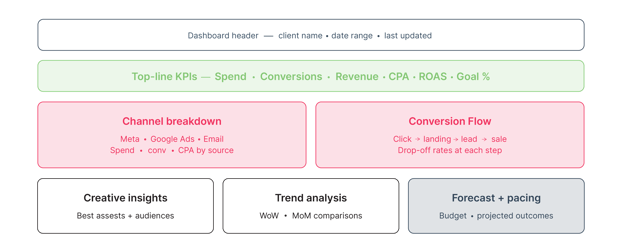
Effective dashboard sections include:
- Top-line KPIs: spend, conversions, revenue, CPA, ROAS, and goal progress.
- Channel performance breakdown: Meta, Google Ads, email, and other sources organised consistently.
- Conversion flow: how users move from click to conversion and where drop-offs occur.
- Creative and audience insights: best-performing assets, audiences, and placements.
- Trend analysis: week-over-week and month-over-month performance comparisons.
- Forecast and pacing views: spend pacing, projected outcomes, and budget alignment.
This structure ensures every client sees the same hierarchy and can follow the performance story without needing additional explanation.
Metrics that belong in automated marketing reports
Automated marketing reports for agencies depend on a focused set of metrics that signal performance changes. Each metric needs a clear definition applied consistently across all clients.
The operational problem appears when agencies overload dashboards with vanity metrics or inconsistent definitions. The strategic consequence is unclear ROI narratives and lost client confidence. The fix is to identify the metrics that drive decisions and standardise them.
Key metrics include:
- Spend: total investment across channels, tracked daily.
- Impressions and reach: indicators of campaign visibility.
- Clicks and CTR: early signals of creative and audience engagement.
- Cost per click: efficiency indicator for traffic-driven campaigns.
- Conversions: defined consistently as form fills, calls, or purchases.
- CPA: cost efficiency across all conversion types.
- Revenue or LTV: where applicable for ecommerce or subscription clients.
- ROAS: performance indicator for revenue-generating campaigns.
This set keeps reports lean, actionable, and aligned with client priorities.
How to maintain data quality in automated reporting systems
Automated marketing reports for agencies require consistent data hygiene to remain accurate over time. Data quality determines whether automation delivers clarity or confusion.
The operational problem appears when integrations break, naming conventions change, or platform updates introduce mismatches. The strategic consequence is faulty reporting and damaged trust with clients. The fix is to monitor data health weekly and implement rules that preserve accuracy.
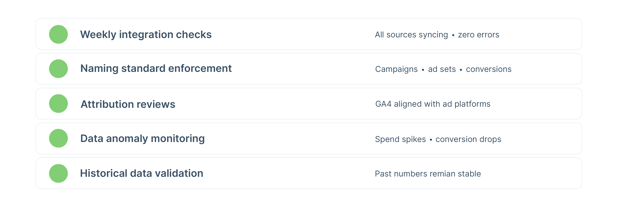
Data quality practices include:
- Weekly integration checks: verify all data sources are syncing without errors.
- Naming standard enforcement: maintain consistency across campaigns, ad sets, audiences, and conversions.
- Attribution reviews: ensure definitions align across GA4 and ad platforms.
- Data anomaly monitoring: catch unexpected spikes or drops in spend or conversions.
- Historical data validation: confirm past performance numbers remain stable.
Maintaining these practices ensures reporting accuracy even as client complexity grows.
Automating agency reports: FAQs
How do I automate marketing reports for my agency?
You automate marketing reports by connecting data sources, standardising metrics, and using dashboards that refresh automatically. This removes manual work and prevents reporting inconsistencies. It also lets analysts focus on performance optimisation instead of spreadsheet tasks. For small agencies, automation improves margins and supports scalable client delivery.
What tools do agencies use for automated marketing reports?
Agencies use data connectors, analytics platforms, and reporting automation tools to unify and visualise client performance. These tools eliminate screenshot workflows and manual data pulls. Many platforms also include AI insights that highlight KPI changes. The goal is consistent reporting across all clients.
What metrics should be in an automated marketing report?
Automated marketing reports should include spend, impressions, clicks, conversions, CPA, revenue, and ROAS. These metrics guide decisions and highlight performance changes. Agencies should avoid vanity metrics that do not impact outcomes. Consistent definitions across clients ensure clarity.
How often should automated marketing reports update?
Most agencies use daily or weekly updates, depending on client expectations. Daily syncs catch issues quickly, while weekly updates support executive reviews. Automated refresh schedules ensure the data is current without manual intervention, reducing delays and maintaining accuracy.
Why do agency dashboards become confusing?
Dashboards become confusing when they mix too many metrics, inconsistent layouts, and unclear naming conventions. This forces clients to interpret the data without guidance. A standardised dashboard structure creates clarity and shortens review calls. It also improves retention by highlighting ROI consistently.
How do I fix data discrepancies between platforms?
You fix discrepancies by normalising attribution windows, conversion definitions, and naming conventions. Platforms measure actions differently, which causes mismatches. Consistent rules reduce confusion during client calls. Agencies should document these rules to prevent ad hoc changes.
Key actions to take
- Standardize all conversion definitions to create stable ROI narratives and reduce client confusion during reviews.
- Build reusable dashboard templates so onboarding new clients takes minutes instead of days and improves reporting consistency.
- Set automated refresh schedules to eliminate manual data pulls and free up analyst time for optimization work.
- Enable KPI deviation alerts to catch issues early and prevent spend waste or performance drops.
- Use an AI insight layer to summarise performance changes and speed up client communication with clear explanations.
Hurree: Automated reporting built for agencies
The real cost of manual reporting is not the hours spent building slides. It is the decisions that come too late because the data was not ready.
Hurree removes that gap. It connects all your client tools into a single platform, refreshes data automatically, and surfaces the insights that matter before they become problems. Agencies stop spending time on reporting and start spending it on performance.
Hurree helps agencies:
- Connect 70+ data sources including GA4, Meta Ads, Google Ads, HubSpot, and CRM tools into one unified view.
- Generate client-ready reports instantly, without copying screenshots or formatting slides.
- Use Riva, Hurree's AI analyst, to get instant performance summaries and predictive insights.
- Set up automated dashboard snapshots and scheduled reports for every client.
- Build customisable dashboards tailored to each client's KPIs and reporting needs.
- Scale reporting operations without increasing headcount or tool costs.
When reporting is unified and automatic, agencies can take on more clients, defend performance with confidence, and spend their time where it creates value.
Stop reporting. Start deciding.
Manual reporting does not just cost hours. It costs opportunities. Every week spent assembling data is a week not spent acting on it. Every delayed dashboard is a client review that relies on incomplete information. Every spreadsheet error is a trust problem waiting to surface.
The agencies growing without burning out are not working harder on reporting. They have removed it from the equation entirely. Automated systems handle the data. Analysts handle the strategy. Clients see consistent, accurate performance — and they stay.
The shift is not complicated. It starts with defining what you measure, connecting the sources that feed it, and building a reporting structure that runs itself. The seven steps in this guide give you that foundation.
Build it once. Trust it every week.
Start automating your client reporting with Hurree.


Share this

Marketing Dashboard Examples: 7 Templates You Can Copy

Why Your Weekly Marketing Report is Taking Longer Than it Should